Showing posts with label ubuntu. Show all posts

Friday, April 24, 2009

Linux Distribution Logos - An Interesting Collection

Happy Friday to everyone,

If you haven't left work yet (assuming you made the double mistake of waking up "and" coming in ;), here's hoping you can get out the door fast. I don't know what the weather's like in your area, but it's going to be nice and balmy around here for the next few days, after which it will, once again, be freezing cold and snowy (I love Chicago :)

I came upon this random collection of Linux logos on Tech Source From Bohol and thought it would be interesting to share. Most of these are just visually interesting. Some of them (like the logo for "Blag" Linux, which I didn't know existed and am dying to try out - yes, just because of the name ;) are a bit amusing. You be the judge. No one should have me as the arbiter of their taste ;) I've only included 20 of them because my bones are brittle and ...I just couldn't stand the copy and paste any more! ;)

Enjoy your weekend and enjoy the logos. Also, stop by Tech Source From Bohol and check out the rest of the 50-logo set, plus all of the other interesting articles and showcases they have over there :)

Cheers,


, Mike


Discover the Free Ebook that shows you how to make 100% commissions on ClickBank!


Please note that this blog accepts comments via email only. See our Mission And Policy Statement for further details.

Sunday, January 25, 2009

The Ubuntu Linux, Possibly Humorous, Religious Marathon Continues

Hey there,

Following up on yesterday's post regarding Ubuntu's Christian Edition, I found this, much more comprehensive page, at The Baheyeldin Dynasty.

If you get a chance, go check the site out. Not only do they have links to Ubuntu Christian Edition, but they've also got links to Jewbuntu (A joke site, but you'll still feel guilty for a long, long time after you read it ;), Ubuntu Muslim Edition (not a joke, but includes a "No Fatwa" guarantee) and a whole lot of other Linux/Unix/Religion-related links (mostly jokes).

If you can take your Faith with an ounce of humour, hop on over there. Half of the site is hilarious and the other half is somewhat-hilarious-yet-somewhat-disturbing-because-it's-true ;)

Also (late breaking news) thanks to Lester McGrath for pointing us in the direction of this entirely separate distribution of Christian Linux!

Enjoy,

, Mike


Discover the Free Ebook that shows you how to make 100% commissions on ClickBank!


Please note that this blog accepts comments via email only. See our Mission And Policy Statement for further details.

Saturday, January 24, 2009

Ubuntu Christian Edition: Truth Remains Stranger Than Fiction

Hey There,

If you haven't had a chance yet, and you're the type who likes to mix your religion in with your work (oh yeah, and you're Christian ;), this Unique Ubuntu Distribution may be for you!

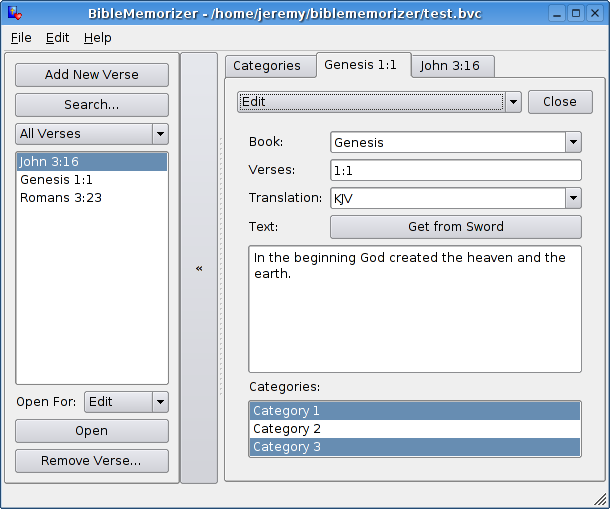
Ubuntu CE (or Christian Edition) offers the user many unique features, including (but not limited to) a Built-in Bible Memorizer (which will allow you to edit the Bible... like Wikipedia, except with the possibility of eternal damnation if you put something incorrect in there on purpose ;) and a Virtual Rosary, which (for some reason I have yet to understand) requires WINE. It would be too easy to go for the Holy Communion connection. Perhaps I'll have an epiphany after I'm finished running this distro through it's paces ;)

For now, enjoy the screenshots below and check out Ubuntu CE for yourself. Just like religion, it's free of charge but will accept donations ;)

May your deity be with you,

The Desktop That Makes You Feel Self-Conscious 24 Hours A Day
Jesus On The Desktop


Think You Can Make The Bible A Better Read? Now's Your Chance!
Edit The Bible


, Mike


Discover the Free Ebook that shows you how to make 100% commissions on ClickBank!


Please note that this blog accepts comments via email only. See our Mission And Policy Statement for further details.

Thursday, January 22, 2009

Setting Up Dual-Dual NIC Bonding On Ubuntu In 30 Seconds

Howdy,

Today we're going to cruise at maximum velocity, assuming that everything's fine (which it probably isn't) and plow through setting up bonding on a quad port nic card on Ubuntu in 30 seconds or less. Of course, it will probably take you longer than 30 seconds to read this post, but the people who publish books like "Linux in 5 Minutes" and "3 minute Abs" are pushing guys like me into a corner. The expectation of today's society is that everything in life should follow theory (If it "can" be done, it can be done ;) and, also, that it's very important to get things done as quickly as possible, especially if it involves dealing with people halfway across the globe from you. Of course, these expectations become more unrealistic by the minute (tick, tock) and most folks' innate need to feel like they "belong" (to what, I won't presuppose ;) keeps this bullet-train hurtling forward at ever-faster speed.

I predict that, in the future, everyone will need to see a psychiatrist daily and swallow approximately 50 mg of Valium, minimum, every 4 hours, in order to keep the heart-palpitations and nervous sweats from killing them either figuratively (as the "New World Office" eats the weak alive) or literally, since children will eventually be born with the irrational fear that they're not accomplishing as much as they should be, and most 12 year old's will be working on their 7th or 8th nervous-breakdown if they're lucky (?) enough to still be alive, in which case they can look forward to their early 20's, by which time they'll probably have worked themselves up to a nice quadruple bypass.

Now, crank the clock back about 60 years. Just 60 years. I have no point here. Just wondering: What's the rush?

The modern workplace always reminds me of a line from the film of Stephen King's "The Shawshank Redemption" - For a point of reference, the narration is that of a prison lifer who's just gotten released on parole in his golden years:

I saw an automobile once when I was young. Now they're everywhere. The world went and got itself in a big damn hurry.


Enough said. Here's a quick rundown of how to setup dual-dual bonding (two bonds of two interfaces each) on Ubuntu as quickly as possible. I wish I could spend more time with you today, but I've got s### to do ;)

The specific instructions which may or may not work for you (If they don't, don't worry, because you can't worry enough ;)

1. Add two lines to /etc/modules

bonding bond0 -o bond0 mode=1 miimon=100
bonding bond1 -o bond1 mode=1 miimon=100


If you're very good at managing your time, just remember that miimon's option determines how often the bond is monitored for failure and that mode can be one of:

0 - Round robin balancing
1 - Active back-up
2 - Transmit based on MAC address for load balancing/fault tolerance
3 - Broadcasting - provides fault tolerance by transmitting on all slave interfaces
4 - Aggregates links, assuming all nics support same speeds and duplex settings
5 - Transmit load balancing - balancing is handled by the bond based on load
6 - Same as 5, but also uses arp to balance load "better"

2. Install the ifenslave package if you haven't already. You can use apt-get to grab it if you don't:

host # apt-get install ifenslave-x.x

3. Ensure that the package actually installed:

# dpkg --get-selections | grep enslave
ifenslave-x.x install


4. Set up your interface files:

host # cat /etc/network/interfaces (only including the parts you probably need - substitute IP addresses, netmasks, etc):

auto lo
iface lo inet loopback

auto bond0
iface bond0 inet static
address 10.10.125.88
netmask 255.255.255.0
network 10.10.125.0
gateway 10.10.125.1
post-up ifenslave bond0 eth0 eth2
pre-down ifenslave -d bond0 eth0 eth2

auto bond1
iface bond1 inet static
address 10.10.127.88
netmask 255.255.255.0
network 10.10.127.0
gateway 10.10.127.1
post-up ifenslave bond1 eth1 eth3
pre-down ifenslave -d bond1 eth1 eth3


5. Add lines to the bottom of your architecture's modprobe files, reboot and pray:

host # cat /etc/modprobe.d/arch/i386

alias bond0 bonding
options bond0 mode=1 miimon=5000 max_bonds=2

alias bond1 bonding
options bond1 mode=1 miimon=5000 max_bonds=2


Congratulations, you're all set. Now get back to work ;)

Cheers,

, Mike


Discover the Free Ebook that shows you how to make 100% commissions on ClickBank!


Please note that this blog accepts comments via email only. See our Mission And Policy Statement for further details.

Wednesday, August 20, 2008

How To Manage Your Disk By UUID On Linux

Hey There,

Today's post is about something I think is pretty cool on Linux (since about kernel 2.1.x, when /proc/partitions was introduced, or made standard). It has to do with disk mounting (both on the command line or through the fstab) by UUID (Universal Unique Identifier). UUID notation, when used as a means to access disk, is just one more way that Linux has moved ahead of the pack to (depending on your way of thinking ;) either make disk management more accessible or make the fstab and disk identification even more confusing ;) NOTE: Skip the next paragraph if you don't care about Open Solaris' slight support for this functionality, to date. Skip to the numbered list if you just want to check out the commands and have had your fair share of my opinion ;)

For those of you who got here by catching the Solaris and Unix tags on this post, I want to address your concerns immediately, since you may no longer be concerned with this text after the next few sentences ;) Although Solaris does "understand" UUID addressing, the level on which Solaris addresses the issue (with regards to disk management) isn't user-friendly enough to fit in the scope of this post. Basically, and this is putting it very generically, the getting and setting of object UUID's on Solaris is still only resident at the code-base layer. I'm glad to see that Sun is addressing the issue with C functions like wsreg_set_id() and wsreg_get_id(), but, since the functionality provided by this layer of access hasn't been implemented in any relevant user tools, we won't be looking at Solaris' implementation of it for the remainder of this dialogue. Ok, I'll give Solaris 10 points for having expanded greatly upon the previous version's acceptance of the standard by implementing a lot of new C routines, a "makeuuid" binary and support for UUID's of zones, but, again, since we're going to be looking at mounting disk using the UUID (without re-writing the OS), Solaris (Open and Regular) is out for now (8/20/2008 just in case the future makes me incorrect, which it has a nasty habit of doing ;)

While Linux boasts most of the same C routines and headers as Solaris (which it must, of course, since the OS supports UUID identification), they're named slightly differently and - the biggest plus - Linux (RedHat and Ubuntu, at least) come with plenty of programs to work with disk UUID's and plenty of hooks to allow other programs to make use of the disk UUID's as well!

The most basic program (that Solaris has picked up on) is called "uuidgen." This program will generate a UUID for you based on the output from a decent randomness-generator (like /dev/random) or resort to time-and-MAC-based randomization ( Generally, the only random factor used is time, unless you have the privilege to view your ethernet adapter's MAC address). The program can be forced to use one or the other, if you have a specific preference (with the "-r" and "-t" flags, respectively). This seemingly extraneous program does have one very important area of application, which we'll look at below.

Where you really see the benefit with Linux is in how they've worked it into their basic hard disk management facilities. They've made it very simple for you to keep track of your disks by UUID using any number of methods. I'll be listing several different means to some "ends" you may want to achieve, as every command may not be available in your Linux distro, but at least one probably is.

One, often unmentioned (but highly valuable), benefit of using UUID's to deal with your disks is that you don't have to worry about system naming conventions and the hassles inherent with using them. For instance, if you have a disk with a specific UUID and a block device name of /dev/sda3, if you do all your work (and system/application customization) with that disk, as the name /dev/sda3, you might be in for a big headache if you have a system problem (or just install some new hardware and reconfigure) and Linux decides to rename /dev/sda3 as /dev/sdb3 (or "anything" else). If you're using UUID's, you can simply use the "tune2fs" command (shown below) to assign the original UUID back to the new logical device name, so /dev/sdb3 would function exactly as if it were /dev/sda3, without causing any issues with your Linux OS :):

1. If you don't know the UUID of your disk, you can find it by using one of the several commands below:

host # vol_id /dev/sda3
...
ID_FS_UUID=a1331d73-d640-4bac-97b4-cf33a375ae5b
...


or:

host # blkid /dev/sda3 <-- Leave blank to show all disks
/dev/sda3: LABEL="/" UUID="a1331d73-d640-4bac-97b4-cf33a375ae5b" SEC_TYPE="ext3" TYPE="ext2"

also:

host # ls -l /dev/disk/by-uuid|grep sda3
lrwxrwxrwx 1 root root 10 11. Okt 18:02 a1331d73-d640-4bac-97b4-cf33a375ae5b-> ../../sda3


2. If you prefer to generate your own UUID's (see above), you can use the uuidgen command and couple it with tune2fs to change the default UUID assigned to your disk by the system, like this:

host # uuidgen
1d721189-7b71-4315-95a7-1c3abc90d379
host # tune2fs -U 1d721189-7b71-4315-95a7-1c3abc90d379 /dev/sda3


3. Then again, if you already know the UUID, you might want to find out what disk it's associated with. You can generally get this information with the "findfs" command, like so:

host # findfs UUID=a1331d73-d640-4bac-97b4-cf33a375ae5b
/dev/sda3


Of course, using some of the commands above and grepping out part of the UUID will also get you your answer, like:

host # ls -l /dev/disk/by-uuid|grep a1331d73-d640-4bac-97b4-cf33a375ae5b
lrwxrwxrwx 1 root root 10 11. Okt 18:02 a1331d73-d640-4bac-97b4-cf33a375ae5b-> ../../sda3


or

host # blkid|grep a1331d73-d640-4bac-97b4-cf33a375ae5b <-- remember that blkid with no arguments returns all of the system disk
/dev/sda3: LABEL="/" UUID="a1331d73-d640-4bac-97b4-cf33a375ae5b" SEC_TYPE="ext3" TYPE="ext2"

4. And, lastly (for this post, at least ;), you can mount your disks using the UUID, and even incorporate that automated UUID mounting into your /etc/fstab. To mount directly from the command line, you can do something like this:

host # mount -U a1331d73-d640-4bac-97b4-cf33a375ae5b /directory/you/mount/this/disk/on

and you could instruct your system to mount this partition by UUID from within the fstab, as well. It works basically the same way that the LABEL keyword does:

host # cat /etc/fstab
...
UUID=a1331d73-d640-4bac-97b4-cf33a375ae5b /directory/you/mount/this/disk/on ext3fs defaults 1 1


And, at this point, you should be able to figure your way around using UUID's to manipulate your disk on Linux with no problem. Enjoy, and please "be careful" :)

Cheers,

, Mike


Please note that this blog accepts comments via email only. See our Mission And Policy Statement for further details.


A comment from Curt, who despises UUID"

I despise UUID with a passion!
An example:
One of my systems has two 200GB hard drives.
Each has over 16 partitions, multiple operating systems and
various data partitions. Now add an external USB hard drive
for backup and restore of partitions.
Imaging trying to figure out how to mount hd1,12 and back it up
to sde4.

Nightmare!

LABEL on the other hand is usable and understandable by humans.
LABEL allows a USB flash drive to always mount the same, solving
that problem.
;<I also dislike using SCSI for PATA drives, limiting partitions to 15,
but that is another story.

Eliminate UUID's and the Microsoft's that create them,
Curt

Saturday, July 26, 2008

More Linux and Unix Laughs For The Weekend

A fine Saturday to you,

Continuing the long tradition (this is the 3rd week in a row now ;) of throwing together some lighter stuff for the weekends, I collected a whole slew of new Linux and Unix related jokes found out there on the web. Today's fare just so happens to be more microsoft-bashing than actual Linux/Unix humor, but that aspect of the plethora of jokes available out there is expected. Users of the competing operating systems have been at each other's jugulars for a long time now. Obviously, I prefer the *nix operating systems to Windows and Mac (although I dig the OS X (and up) underlying BSD-ish OS). I must admit, however, that I do, very often, use Windows to run terminal software so that I can connect to my *nix boxes ;)

Most of this material is from a long running thread at The Ubuntu Forums. The apt-get joke is actually classified as an "Easter egg" and I found that at eegs.com. I'd recommend checking either site out. From the Ubuntu forum, I pulled my favorites, but you might like some of the other stuff on the 9 pages (and counting). The Easter egg site is pretty cool, too. Lots of stuff that isn't necessarily funny, but kind of cool and obscure.

Please note also, that the "sudoit" image comes from xkcd.com and was created by Randall Munroe. I had originally just attributed it to the message board, but thanks to the astute reader who knew where it "originally" came from and was kind enough to point this out. Attribution for this work will be repeated directly beneath the illustration.


I've split these jokes up into 3 sections: MS Bashing, Straight-Up Jokes That Don't Involve Bill Gates and The Easter Egg. For all the pictures, you can click on them to get to a larger (and perhaps more readable) version.

Here's hoping your weekend is pleasant and at least one of these jokes make you laugh quietly to yourself. LOL if you must ;)

Cheers,

Part 1 - MS Bashing:

Macs are for those who don't want to know why their computer works.
Linux is for those who want to know why their computer works.
DOS is for those who want to know why their computer doesn't work.
Windows is for those who don't want to know why their computer doesn't work.

"When you say 'I wrote a program that crashed Windows', people just stare at you blankly and say 'Hey, I got those with the system, *for free*'." -- Linus Torvalds

Have you ever noticed that at trade shows Microsoft is always the one giving away stress balls?

A Penguin Guzzling Down Windows

Part 2 - Straight-Up Jokes That Don't Involve Bill Gates:

Hardware: The part of the computer you kick when the software stops working.

A Geek's one night stand:

whois && gawk && uname && talk && date && wine && touch && unzip && strip && touch && finger && mount && fsck && more && yes; yes; more; yes; umount && make clean && sleep


host # cat "door: paws too slippery"
cat: cannot open door: paws too slippery

host # touch /woman
touch: cannot touch `woman': Permission denied

sudo chown -R us ./allyourbase <-- For information about why this is slightly amusing, check out the "All Your Base Are Belong To Us" page on Wikipedia. They actually have a very in-depth history of this mangled video game dialogue translation :)

If sudo was used in our daily lives
(c) Randall Munroe xkcd.com

Part 3 - The Easter Egg:

The Advanced Package Tool (APT) is a part of the software management system for Debian. Analogous to RedHat's RPM, but infinitely more capable, APT features automatic dependency handling and much more. If you're not a Linux type, it's like Windows Update for adults.
1. Login to a shell as root.
2. Type "apt-get moo" and press ENTER.
3a. An ASCII-art drawing of a cow will be displayed, with "Have you mooed today?".
3b. If you use just "apt-get", a help file is shown with the various switches available. At the very end it says "This APT has Super Cow Powers".

, Mike

Thursday, July 3, 2008

UnConfusing The Issue Of Disabling Root On Linux or Unix

Hey There,

Loosely following up on a few previous posts regarding securing Linux and Unix and even more fun with Unix and Linux security, today we're going to look at something vaguely security-related, and also vaguely scary ;)

It has to do with the root account (or user id 0) and security hardening. I've got nothing against either, so this won't be an insane diatribe, but (especially, no offense to Ubuntu) with more Linux distro's coming straight out-of-the-box with root disabled, I see the issue of security and the root user get a little confused. A lot ;)

There are a numbers of things at issue here, and they're all loosely tied-together by the common thread of an earnest striving for better total-system security. Today, I'm just feeling like clearing some of them up to the best of my ability, before they make me nuts.

1. Having a disabled root account and removing a root account are two entirely separate things. As I mentioned above, Ubuntu comes with the root account disabled (basically, you can do this on any OS by running "passwd -l root" as the root user, hopefully setting a regular user up with a sudo rule so they can su to root if they need to later, and then exiting out of the root account).

This is perfectly fine. It upsets quite a few people who don't know what to make of it, initially, but it's not a bad idea. The root user's password is locked, so no one can su to it without sudo (or some other privilege-escalation vehicle), but the account still exists and runs as normal.

It goes without saying, at this point in the post, that actually removing root (userdel root will fail - probably too late - but you can accomplish almost the same thing by editing /etc/passwd, /etc/group, /etc/security/*, etc, as root and logging out) is a bad idea. The problem then becomes that, not only can no one su to root, it's actually gone, and everything that used to run as uid 0 will begin to exhibit bizarre behaviour. Without intervention you can expect to lose your system fairly quickly and have the boot process crash on you as soon as it gets to running init, at best. By default, on almost every system I know, init runs as root, spawning "init" (process 1 - the mother of them all). If that can't start, what else can? I've heard tell of systems that will revert to the nobody account to run this, but I've never seen it happen and I can't imagine how it would work...

2. There are ways to run your system without having a root user, but almost all of them are not worth the effort. As a blanket statement, if you replace the root account with another account with uid 0 (Except in such instances as FreeBSD, where they've gone through the trouble of actually coding out a "toor" user as a root variant), you're opening up the door to any number of problems you may have not foreseen. Replacing uid 0 with uid 100034 (pick a number) would be even more probable to cause stress-related fatalities ;) Liken it to the old-style firewall security method of "block what you don't want and let everything else in." That philosophy was eventually replaced by the more sensible "block everything and only let in what you want" method. If you mess with root, or uid 0, you may have a huge list of things you've accounted for, but you're almost guaranteed to stung by something you'd (and anybody else probably would have) forgotten or never even considered.

3. Changing init in Linux using the boot loader (with arguments like init=/bin/bash) doesn't actually address the issue with running init without root, or a user with uid 0. This trick can come in very handy when, for instance, you want to subvert LILO or Grub security and boot into bash. Of course, / will be mounted read-only, but it's only a minor inconvenience to run "mount -o rw,remount" on it to begin editing files you shouldn't be editing. Of course, you'd only end up doing this if you were in it deep and had to manually edit your /etc/shadow file or something, right? Yes. That's the ethical answer :) As far as hardening security goes, I'm not sure how this misconception got started.

4. Having more than one user with uid 0, or more than one group with gid 0, is not only insane, it's lazy-insane ;) Seriously, I've seen this proposed as an alternative to locking root's password and using sudo in order for certain users to access root to make changes as the superuser. There are a few issues with this sort of convenience, none of which are good (except, that 5 or 6 guys on your system have uid 0 and root privilege which is great! ...I mean bad). Aside from the simple "plus 1" factor of risk-of-accidental-keystroke-downing-your-machine incidents per user with said privilege, having multiple users with the same uid and/or gid can cause erratic behaviour with programs that do name-to-uid and/or uid-to-name mapping (like the login command).

All of this comes back to locking up the root user password. This is (assuming you have to pick from that and the 4 options above) the most sane choice. I'm not gonna shine you on about how I've never used root as my main account for years on end and haven't ever accidentally deleted the /dev filesystem (well, at least as much as it would let me before there was no device left to do the deleting ;) I've done lots of crazy and irresponsible things in my career and, according to some folks (like the U.S. military and heavy-hitting banking and/or securities-trading companies) I still do, no matter how good I try to be ;)

But I think, if you must tighten the screws on the root account, then look to Ubuntu's example and have the default setup with a locked root password and a user account that can "sudo su" to it. There's no need to be any more extreme or creative and, if you decide that you must and haven't completely profiled your operating system's kernel and shell code before implementation to ensure safety from latent dependency bugs (or somehow managed to figure out a way to defend against an army of guys/gals with root privilege easily and with guaranteed low-downtime), may luck be with you. And, if it's not, may you have an understanding superior.

Hopefully, this hasn't confused the issue even further. Whatever the issue was... ;)

Cheers,

, Mike